
SSL certificates
Know whether the certificate your visitors receive is valid, and get a warning when fewer than 30 days remain.
ValidDemo
- Time left
- 64 days
- Issued by
- Example CA
- Checked
- Every 6 hours
Website monitoring features
Monitor uptime, response times, SSL certificates, domain expiration, and DNS from one clear dashboard. Stay informed about confirmed incidents and understand how your websites are performing.
Response time, 24 hours
Last incident
HTTP 503
Resolved, down for 18 minutes
Complete website visibility
Every website you add receives uptime, SSL certificate, domain, and DNS checks, on every plan, including Free. You do not need a separate service for each one.
shop.example
Counts as 1 websiteKnow when your website stops answering, and see how available it has been.
See whether the certificate is valid and when it expires, so renewal is not a surprise.
Keep the registration date in view, wherever the registry publishes it.
Check that your domain name still resolves to a public address.
One website is one exact address, so shop.example, www.shop.example, and shop.example/blog count as three. The certificate check applies to https addresses.
Uptime and performance
Track availability and response times with a clear history that helps you spot interruptions and changes in performance.
Response time, last 24 hours
24 hours agoNow
Availability, hour by hour
One check, from Starter212 ms
More than uptime
Availability is only part of the picture. UptimeWire also tracks certificate validity, domain expiration, and whether your domain name still resolves.
Know whether the certificate your visitors receive is valid, and get a warning when fewer than 30 days remain.
ValidDemo
See when the registration runs out, and get a warning when fewer than 30 days remain. Some registries publish no date; then the check shows it as unknown.
Expires soonDemo
Check that your domain name still resolves to a public address, see the addresses found, and hear about it when it stops.
ResolvingDemo
Incident history
One failed check is not an outage. UptimeWire confirms the problem first, then keeps the record: cause, duration, and the failed checks behind it.
The reason is recorded, such as HTTP 503 or a timeout.
Each comes about 20 seconds after the last failure.
Another server or other locations check the same address. If the site answers for them, no incident opens.
The incident opens and your alerts go out.
The site must pass two checks in a row, about 20 seconds apart.
You hear about it, and downtime is counted from the first failed check.
With several locations, a website counts as down only when more than half of those that answer agree. A problem seen from a minority of locations appears on the website page, without an alert.
Locations by plan: Free 1, Starter 2, Business 3, and Agency 5.
Each incident keeps its cause, start, end, duration, and failed checks. History by plan: Free 30 days, Starter 90 days, Business 1 year, and Agency 2 years.
Notifications
Receive notifications about confirmed incidents through the channels you set up, and stay informed without watching a dashboard. You hear again when the website recovers.
Every channel carries outages and recoveries. Certificate, domain, and DNS warnings go by email and Telegram.
Status communication
Share availability and incidents on a public page, so customers can see the current state of your services for themselves.
All systems operational
Online store99.97%, 90 days
Help center100%, 90 days
Online store, HTTP 503, down for 18 minutes
Help center, tomorrow
Not included in Free. Status pages by plan: Starter 2, Business 5, and Agency 25. Your logo and your own domain are available from Business.
Daily availability
Monitoring insights
Understand availability and performance over time. Every plan keeps uptime figures and incident history in your dashboard.
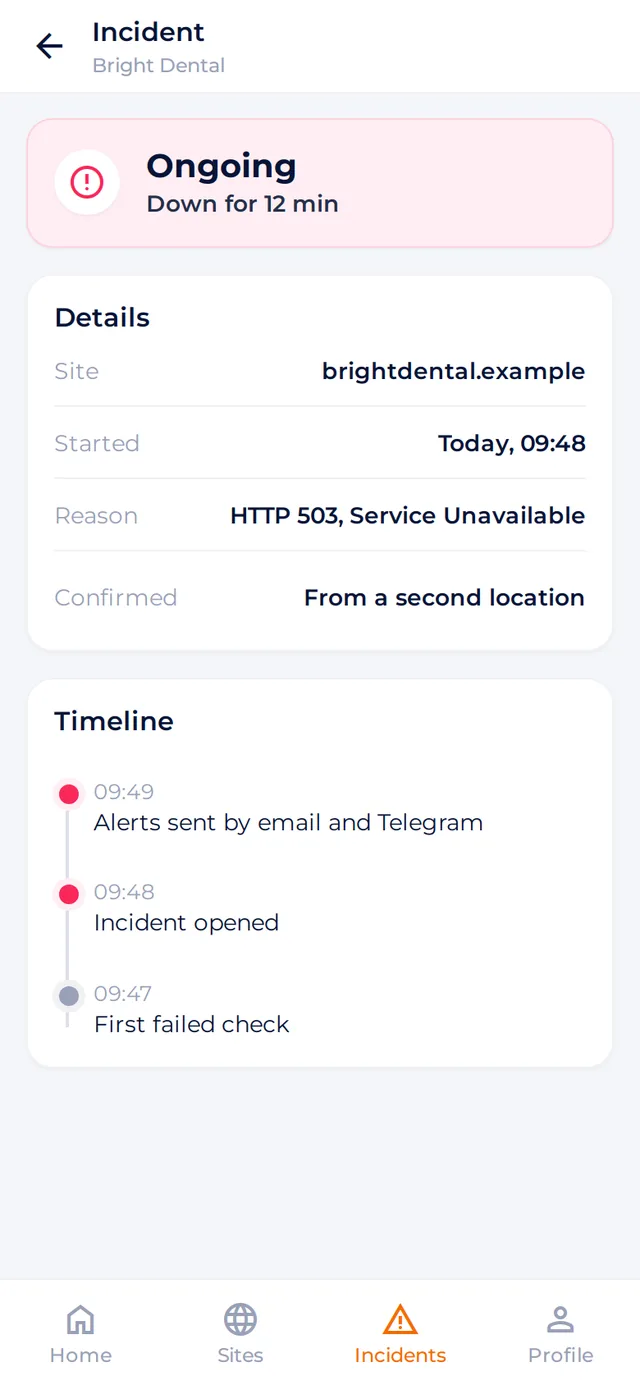
Monitor anywhere
Check status, review incidents, and stay informed from the UptimeWire apps for iOS and Android.


At a glance
Each row shows the plan a feature starts from. Compare plans
Frequently asked questions
For each website: whether it answers and how fast, its SSL certificate, its domain expiration date, and whether its domain name still resolves.
One exact address. shop.example, www.shop.example, and shop.example/blog count as three websites.
Yes. Uptime, SSL certificate, domain, and DNS checks are included in every plan. The certificate check applies to https addresses.
You choose the interval. The shortest one depends on the plan: Free 5 minutes, Starter 3 minutes, Business 1 minute, and Agency 1 minute. Longer intervals are available too. Certificates are checked every 6 hours, DNS every hour, and domains once a day.
A website must fail three checks in a row, about 20 seconds apart, and a second opinion is then taken from another server or from your other check locations. If they see the website working, no incident opens. Alerts go out once the incident is confirmed.
Yes, on paid plans. Check locations by plan: Free 1, Starter 2, Business 3, and Agency 5. A website counts as down only when more than half of the locations that answer agree.
By email, Telegram, and push on every plan. Webhooks and Discord start from Starter; Slack, Microsoft Teams, and SMS packs from Business. Certificate, domain, and DNS warnings go by email and Telegram. SMS packs cost $1 for 10 SMS, $2 for 20 SMS, or $5 for 50 SMS; SMS alerts are coming soon.
Yes. UptimeWire has apps for iOS and Android, where you can check status and review incidents.
Add your first website, explore its monitoring information, and stay informed about important changes, all from one clear dashboard.